Build Your Own Morning Researcher
A follow-along guide to a news-briefing agent that runs every morning: what to do, and why it's built the way it is.
This guide is two documents wearing one URL.
The first half is a follow-along: point, click, talk to Claude, done. You can finish it in fifteen minutes without understanding a single design decision, and it will just work.
The second half is why it's built this way. The ideas that transfer to every agent you're likely to build or buy.
Do the first half now and the second half never, and you've had a good morning.
Read both and you've got a head start on the next five things you'd like to build.
Either way, you'll know exactly when you're allowed to stop.
What we're building
Every morning at 7:00, a researcher wakes up inside a folder on your computer. It searches the topics you care about, skips stories it has already shown you, reads the promising ones, and writes you a briefing — a clean web page waiting with your coffee.
Because I'm a hospitality nerd, it ships tuned for hospitality AI: product launches, funding, partnerships, adoption. If that's your beat, it works out of the box. If not, a five-minute interview with Claude retunes it (Part 2).
What you need
The Claude desktop app. You'll be using Cowork, so you'll need a paid account — but the cheap one will do just fine. I'll show you how to find Cowork, at least as it looks in August of 2026, in the Build section below.
The
agent-newsrepo. A few dozen KB of plain text, free on GitHub — you'll grab it in Part 1.
That's it. That's all.
The Build
Part 1: Point Cowork at the folder (once)
Download the folder from github.com/brmore/agent-news (Code → Download ZIP) and unzip it. You can also browse every file in the repository before you download — wise, if you're the trust-but-verify type.
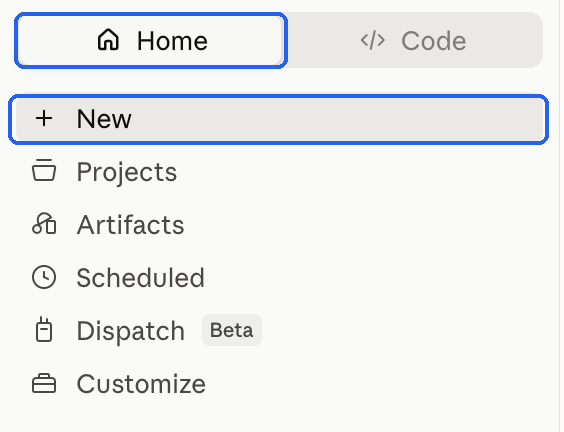
Open the Claude desktop app, sign in if you need to, make sure you're on 'Home' and not 'Code', and click 'New'.
- Click the 'Cowork' tab in the 'How can I help you today' box, then pick your folder from the selector just below it. (GitHub's ZIP tacks the branch name onto the folder, so it'll read
agent-news-mainunless you rename it.)
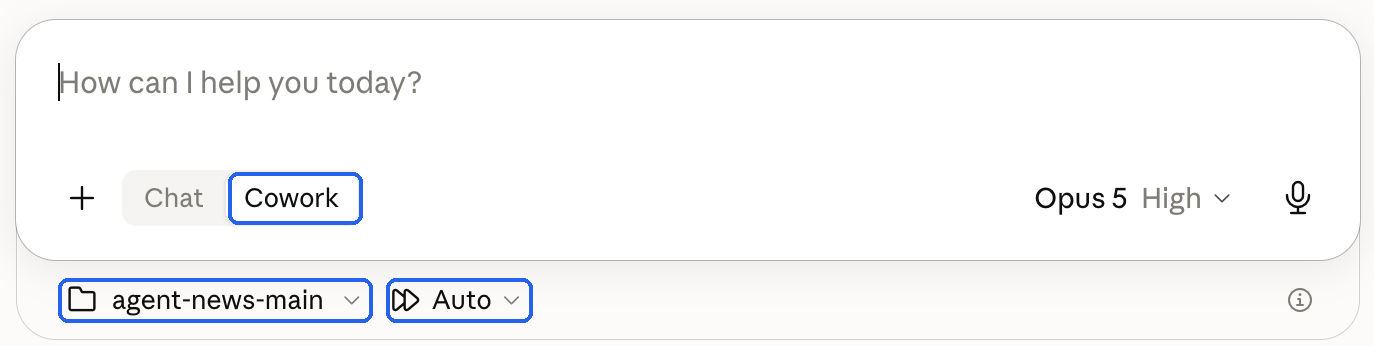
One more thing while you're in that row: next to the folder selector is an approval mode, and it defaults to Manual. Switch it to Auto. On Manual, Claude stops to ask permission for essentially every file it touches, and a briefing run touches a lot of files — you'll spend the run clicking instead of reading. Auto is the right setting for a folder that contains nothing but this project.
Now you're done. Everything else will happen by talking to Claude. And Cowork only ever sees that one folder.
Part 2: Define your beat
(skip this if hospitality AI is your beat)
Two files define your researcher:
topics.md(what it should care about) andsources.md(where it should look).
If you want a different beat, type:
Run prompts/1-seed-topics.md
Claude will interview you, asking three or four easy questions: what subject, what kinds of developments matter, any names to always watch, anything to exclude.
It writes your answers into topics.md, then automatically seeds sources.md with outlets that match. One pass, no second command.
Prefer to type it yourself? Edit topics.md directly (it's plain-text with instructions at the top), then type "Run prompts/2-seed-sources.md" to refresh the source list to match.
Anything you put under Added by you in sources.md is never touched by the automation. That section is yours alone.
Part 3: Run it now
Don't wait, do it now ... type:
Run prompts/3-daily-briefing.md and render today's page
The first time you do this, Claude will stop and ask permission — usually more than once, and the wording varies with what it's about to do.
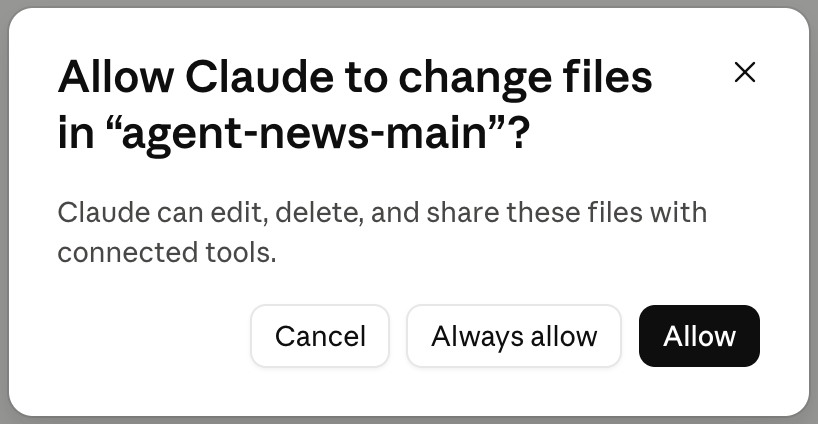
Read each one, then approve it. That's not a formality — the dialog names the folder, and the folder it names should always be yours. Approving is how the agent gets to do its job; reading first is how you stay the one deciding what that job includes. Always allow stops it asking again for that kind of action.
Here's what happens, in order. Worth reading once so the output makes sense:
Load. It reads your topics, your sources, and its memory of everything it has already covered.
Search. It searches each topic, biased to the last 24 hours, on your preferred sources and the open web (so it catches news your source list didn't predict).
Dedupe. It drops anything it has shown you before, including the same story under a different headline on a different site.
Rank and read. It ranks the survivors and reads the top-ranked ones, up to its fetch budget (a dial explained in the second half).
Write. It writes the briefing as Markdown to
raw/<today's date>.md, then runs the render script, which producesbriefings/<today's date>.html: a single, portable, styled page. Open it in any browser.Remember. It logs each verified story to
raw/seen-index.mdso tomorrow's run won't repeat it.
What a good first run looks like: a handful of stories with sources and dates, each summarized in two to four sentences with a link; possibly a short "Also noted" list of unverified headlines at the bottom; a closing line naming the sources scanned. A quiet news day produces a short briefing. That's correct behavior, not a failure; it will never pad the page to hit a quota.
If something goes sideways: fetches fail sometimes, and the briefing says so rather than papering over it.
If the page looks unstyled, ask Claude to re-run the render step.
If you run it twice in one day, the second run will mostly come up empty; that's the dedupe memory doing its job.
To make a story eligible again, delete its row from raw/seen-index.md.
Part 4: Schedule it
The natural next step is a schedule, and it costs one sentence; type:
Run my briefing every day at 7:00 AM
Or weekdays-only, or at 6:30, whatever — say it in plain language, in this same Cowork chat, and change it later by asking again.
What you just made lives on the Scheduled page in the left sidebar — the one you scrolled past in Part 1. Worth knowing it's there: that's where you edit the time, pause it, or run it on demand. (Current as of August 2026; if the menu has moved, that's still what you're looking for.)
One thing worth understanding about what just happened. Most Cowork scheduled tasks run on Anthropic's servers, which is why they can fire with your laptop shut. But you set this one from a chat pointed at a folder on your computer, and a task that needs local files can't run on a server — so it quietly stays on your machine, which needs to be awake with the Claude app open at 7:00.
If it sleeps through a run, you're not stuck: type Run my briefing and you get the same output when you sit down, a few minutes late.
(One footnote that will save me a support email: the folder path lives in the task, so if you rename or move the folder, go back to the Scheduled page and point the task at the new one. Ask me how I know.)
That's the whole build. It runs every morning, forever.
Congratulations! You can quit here if you want to.
But the reason to build an agent instead of just using one is this next bit.
The rest of this guide is why it's built this way — six ideas you'll reuse in every agent that comes after this one, plus everything you can tune or bolt on once you know how.
Fifteen minutes of reading will outlast this tool.
What's in the box
Here's the whole machine on one screen — you've already run every box in this picture:
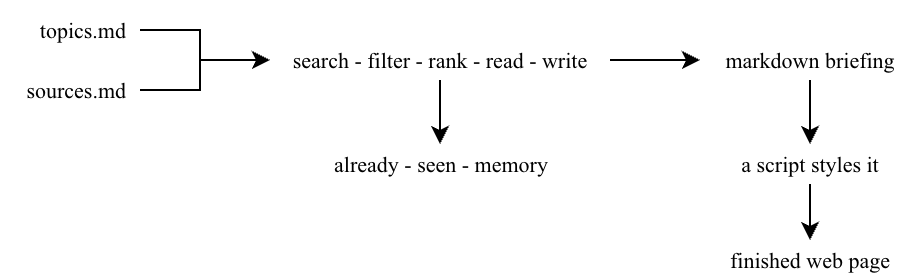
Your two files feed a single pass: search, filter, rank, read, write. The pass consults a memory of everything it has already shown you, writes plain Markdown, and hands that Markdown to a script that styles it into the finished page.
Every design decision in the next section lives somewhere in this picture.
Why it's built this way: six principles
1. Separate substance from style
A morning briefing is two different jobs.
Content is judgment: which stories matter, whether two headlines are the same event.
Presentation is repetition: headers, margins, fonts, identical every day.
So the model writes plain Markdown, a format that by definition can't express visual style.
An 80-line script drops that Markdown into a template, the same way every time. Determinism. The model physically can't leak presentation into the substance, and you never pay tokens for rote layout work.
The rule: model for judgment, script for layout. If a step has exactly one right answer, it belongs in a script.
2. Criteria beat scores
A tempting way to grade candidate stories is to have the model score them: Relevance: 52%. Impact: 3.8/5.
Don't.
A model reporting "52% relevant" isn't measuring anything; it's decorating a lean it already had. A made-up percentage feels like a rule and behaves like a vibe.
This build uses the two things models are genuinely good at instead:
hard yes/no criteria (on topic? from the last 24 hours? concrete? linkable?)
relative ranking (which of these two stories matters more to this reader?)
A model can't reliably tell a 73 from a 76, but it's very good at "this one over that one."
The rule: absolute where the fact is hard, relative where the decision is judgment. The moment you invent a threshold like 50%, replace the number with criteria.
3. Budget the expensive thing
Searching is cheap: titles, links, snippets.
Reading a full page costs real context and compute.
So the governor isn't a story count, it's the fetch budget. Search widely, rank from metadata, and spend the money on the top contenders only.
It's one number in prompts/3-daily-briefing.md (default 15).
Turn it up for depth, down for economy.
The story count stays open on purpose. Three stories worth reading today, you get three. Ten, you get ten.
A fixed quota forces the model to pad quiet days with debris; an open count bounded by a cost cap gives you honest output at a predictable price.
The rule: cap what costs money, not what's visible.
4. A prompt is an instruction, not a program
The topic list reads like a loop: "for each topic, run a search."
It isn't.
On one test run, twelve topics became three searches, because the model recognized several as near-synonyms and merged them. Sensible, and also not deterministic: run it again and it might search differently.
A program repeats twelve searches because the list has twelve lines.
A model interprets the request.
For a personal briefing, that flexibility is a feature. But know which one you're holding: if you need exactly one search per topic, guaranteed, that's a job for a script, not a prompt.
The rule: use judgment where judgment helps; use machinery where guarantees matter. That distinction is most of what "working with a model" actually means.
5. One pipeline before a team
You'll see agent workflows built as teams: a scout that searches, an analyst that ranks, a writer that drafts, an orchestrator directing traffic.
That structure is real and sometimes right, but a team earns its keep when scale or security demands separation.
For instance, a writer that physically cannot reach the web is a genuine safety property in an untrusted setting, and a pipeline processing hundreds of items needs stages with their own context.
This build is deliberately one reasonably well-structured pipeline instead: search, rank, read, write, in a single pass.
For one person's desktop running a focused daily beat, that gets the same result with fewer moving parts, fewer hand-offs to pay for, and one place to look when something needs adjusting.
The rule: bring in the team the day scale or security actually demands it. Start with the pipeline; you'll know when you've outgrown it.
6. Build a gate (or two)
One lesson from testing is worth telling on its own, because it's the difference between a briefing you skim and a briefing you rely on.
An early test run cut a corner: it found plausible stories, read a summary page, and wrote briefs about announcements it never opened directly.
The output looked fine, which is exactly why that failure is dangerous.
A polished paragraph can hide a weak chain of evidence.
So the run now has a grounding gate: every story in the main briefing must be backed by a page the tool actually fetched. Promising headlines it only glimpsed in search results aren't dropped; they're demoted to a clearly labeled second tier:
## Also noted (headline only — not yet verified)
        Marriott tests autonomous check-in kiosks · TechCrunch · [Link]
Two tiers: stories it read, and stories it merely noticed.
No confidence scores, no pretending a snippet is verified news.
Unverified headlines aren't logged to memory, so if the story firms up tomorrow, it's still eligible for a full brief.
The rule: don't ask for honesty, build a gate. A rule the model can skip will eventually be skipped.
A brief aside on where schedules live
If you've read Anthropic's docs, you know scheduled tasks now run in their cloud — great for workflows built on connectors and files saved to your Claude account, because they fire with your laptop closed.
So why does this build still schedule locally?
Because a cloud run can't reach a folder on your computer, and a folder on your computer is the point: plain-text config you can read, memory you can inspect, output you own, no account dependency.
That is a trade, made on purpose.
The cloud version of this agent is buildable. Move the files into your Claude account, rebuild the runbook around it, and it'll work.
But you'll give up the thing that makes this learnable: everything in one folder that you can open, copy, or delete.
Local files mean local runs.
Now make it yours
None of this is required, and the briefing is complete as-is.
But if you're brave and inclined to tinker, here's the map of what's yours to touch:
| File / folder | Role | Edit it? |
|---|---|---|
topics.md |
Your beat, keywords, and filters | Yes, this is the main dial |
sources.md |
Hand-picked outlets and newsrooms | Yes, add trusted sources under Added by you |
briefings/style.css |
The look: fonts, colors, spacing of the page | Optional, restyle to taste, or ask Claude to |
prompts/3-daily-briefing.md |
The morning runbook | One number: the fetch budget (see Principle 3) |
raw/<date>.md |
Each day's briefing in Markdown, one file per run | No, but read them — this is the archive the weekly digest reads |
raw/seen-index.md |
Memory that prevents repeats | Only to delete a row and make a story eligible again |
briefings/<date>.html |
The styled page you actually read each morning | No, it's rebuilt on every run |
scripts/render.js |
~80-line, dependency-free HTML builder | No, runs automatically |
prompts/1-seed-topics.md |
The setup interview | No, just run it |
prompts/2-seed-sources.md |
Source refresher | No, just run it |
You can't really break anything. Every file is plain text, everything is in one folder, and if you want a safety net, copy the folder before experimenting. (The one thing that isn't in the folder is the schedule — see Part 4's footnote about moving or renaming.)
Beyond the dials, every upgrade below is a single sentence to Claude in the same Cowork chat, not a project. In roughly ascending order of ambition:
Send it to your inbox. "After each run, create an email draft of today's briefing addressed to me." Draft, not send: you stay the one who hits the button.
Post it to Slack. "After each run, post today's briefing to my #industry-news channel." Works for Teams the same way. A channel briefing is a nice way to share the beat with a team without forwarding HTML files.
Put a TL;DR on top. "Add a two-sentence executive summary at the top of each briefing." One line in the runbook's output format, and every future page has it.
Add a weekly digest. "Every Friday, read this week's briefings in raw/ and write a weekly roundup of the five stories that mattered most." The daily files are plain Markdown sitting in a folder; anything can re-read them.
Restyle the page. "Make the briefing dark-mode." Or match your company colors, or make it print cleanly. Only
briefings/style.csschanges; the words never do.Teach it your taste. "Flag funding rounds under $5M as minor." "Always lead with anything involving a named hotel brand." Have Claude fold corrections like these into the Preferred angles in
topics.md. You're building an editorial voice one correction at a time.Run a second beat. Copy the whole folder, rename it, re-run the topics interview. A competitor watch, a regulatory watch, and a general industry briefing are three folders, not three projects.
Add a stage when a real need shows up. A fact-check pass before the write-up, a second-language edition, a "read the comments too" step for one source. This is the moment Principle 5 was saving you for: extend the pipeline because something concrete demanded it, not because a diagram looked impressive.
Point the pattern at your own data. The furthest ambition on the list: everything here (plain-text config, judgment in the model, mechanics in scripts, budgets on the expensive step, a gate before you trust the output) works the same when the "sources" are your own reports and systems instead of the trade press. That one is worth a conversation with your technical folks, and you'll walk into it already knowing why the architecture works.
The model handles the judgment, the scripts handle the mechanics, and your briefing is waiting when you sit down. More to the point: you now know why it works, which means the next agent you build won't start from zero.
The folder is at github.com/brmore/agent-news whenever you want it.